First day cover ·
Apple Watch Gets Always-Listening Beta With Siri Recap and Live Rewind
Apple's iOS 27.3 and watchOS 27.3 developer betas bring ambient Siri Recap and Live Rewind to Apple Watch Series 12 and Ultra 4.
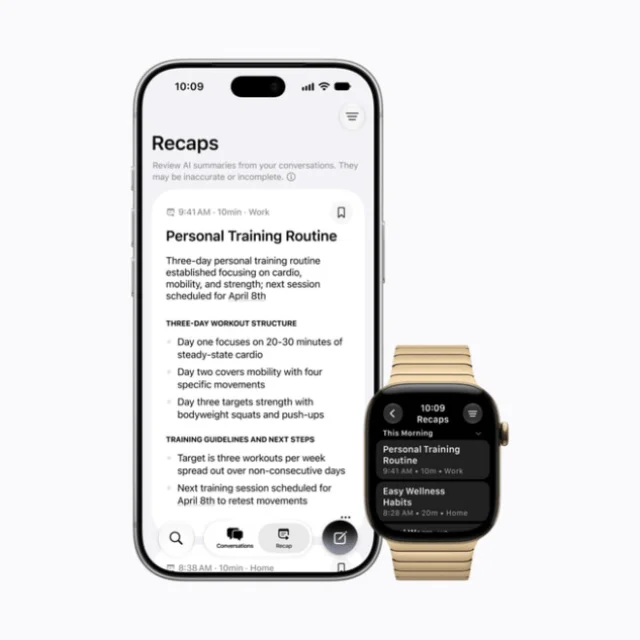
Apple's always-listening features for the Apple Watch have moved out of the September keynote and into developer hands. The first betas of iOS 27.3 and watchOS 27.3 arrived on Tuesday, putting the Audio Intelligence tools on the Apple Watch Series 12 and Apple Watch Ultra 4. My read: this is the first real test of whether ambient AI on a wrist-worn device feels useful or just unsettling.
The short version is that the watch's microphone and on-device AI process nearby speech, with Private Cloud Compute handling some tasks. Two features depend on near-continuous listening, and they work very differently from each other.
Siri Recap: summaries of conversations you were in
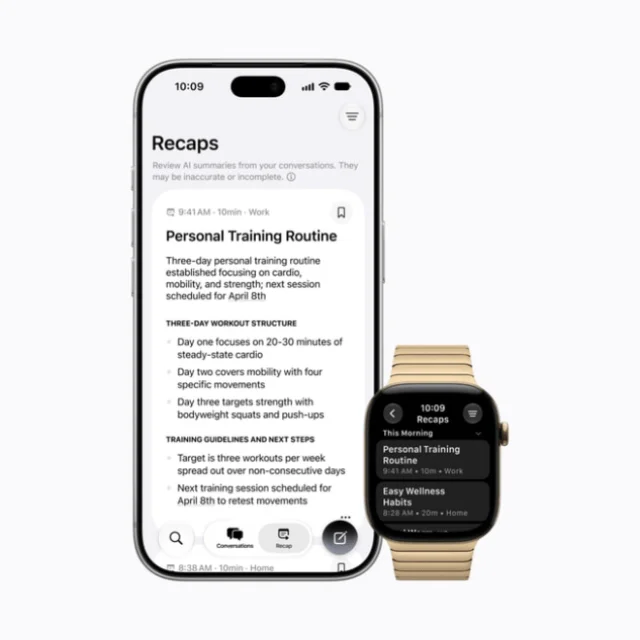
Siri Recap listens for conversations the wearer takes part in. Once a conversation ends, Apple Intelligence produces a title, a short summary and a set of key points. It doesn't produce a full transcript, and it doesn't attribute lines to individual speakers. Those recaps show up in the Siri app.
The controls are where I'd expect most people to spend their time. You can schedule Recap to run only at certain times, such as during work hours, or switch it on and off from Control Center. Recaps are not kept by default. The watch prompts you to review them and save the ones you want, and anything unsaved is deleted after seven days. Apple says the system is designed to leave out sensitive details such as financial data or identification numbers.
Think of Recap as a memory aid for meetings, errands and long conversations you'd rather not reconstruct from scratch. The value depends on how well the summaries capture what mattered, and that's something only hands-on testing will show.
Live Rewind: the last 15 seconds, on demand
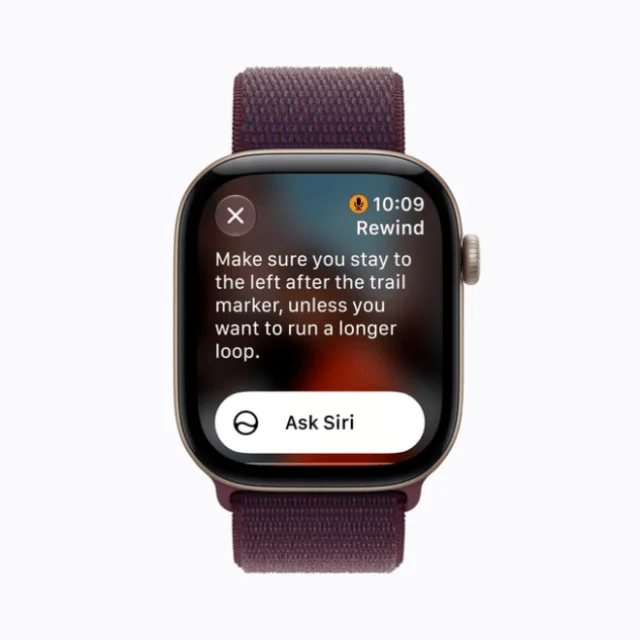
Live Rewind is the narrower and more immediately practical of the two. The watch keeps a short rolling audio buffer. Double-press the Digital Crown and it shows a text snippet of roughly the previous 15 seconds of speech. That's handy for catching a restaurant's daily special or a set of directions you didn't quite hear.
Because the feature is always capturing something, Apple has built in signals. An audible chime and an on-screen animation play even when the watch is in silent mode, so the act of recalling speech is never invisible. Unsaved snippets disappear quickly. If you keep one, it lives in the Siri app, where you can query it further with "Ask Siri."
Hardware and availability limits
Both features are strictly opt-in, and they're tied to a specific stack. You need an Apple Watch Series 12 or Ultra 4, which run on the S11 chip and its Secure Exclave for isolated audio handling. The paired iPhone needs to be an iPhone 16 or newer that supports Apple Intelligence and Siri AI. The iPhone 16e is excluded.
Language support is English only for now. Apple isn't launching the features in the EU initially, because broader Siri AI support isn't available there yet. The features are also unavailable to users under 13, and some reports put the age floor at 18. Treat the age details as reported rather than confirmed until Apple's documentation settles them.
The privacy design, and why it matters here
Ambient listening on a wearable raises an obvious question: who else in the room is being processed without knowing it? That's the debate currently surrounding AI wearables such as Meta's smart glasses, which can capture ambient audio around people who never agreed to be recorded. Apple's answer rests on opt-in controls, short buffers, no persistent raw recordings and visible or audible cues for Live Rewind, rather than continuous recording.
Apple has described the processing chain in some detail. Raw audio is handled in a hardware-protected buffer on the S11's Secure Exclave. It isn't saved as a file, and according to Apple it isn't accessible to the operating system, apps or Apple itself. For Siri Recap, condensed text is encrypted and sent to Private Cloud Compute for summarization, and the intermediate data is deleted afterward. Saved recaps and snippets sync via iCloud with end-to-end encryption, provided two-factor authentication and a device passcode are enabled. Apple has published a technical privacy overview, which is worth reading if you want the specifics rather than the summary: technical privacy overview. There's also a support article covering the feature on these watches: About Audio Intelligence features on Apple Watch Series 12 and Apple Watch Ultra 4.
Here's the thing: the architecture answers the question of what happens to your audio. It doesn't fully answer how the people around you feel about being summarized. A recap that skips speaker names is less revealing than a transcript, but a bystander in a meeting may still not realize their words are being processed. That's the gap I'd watch most closely as the features move out of testing.
Timeline and what could still change
Developer betas are available now. Apple has indicated that a public beta is expected to follow, with a full consumer release targeted for December. Apple describes the battery impact as negligible, though that's a claim to verify on your own hardware once you can test it.
The features are still in testing, so behavior, language support and availability may change before launch. If you're considering an Apple Watch Series 12 or Ultra 4 partly for these tools, I'd wait for the public beta. It will show whether Recap's summaries are actually useful day to day, and whether Live Rewind's chime and animation feel like a reasonable trade-off for the convenience. Right now, the architecture looks careful. The everyday experience is the part still to be proven.


