First day cover ·
iOS 27.3 Beta Adds Limited Front Camera Unlock for iPhone Duo
iPhone Duo can unlock from its closed Lock Screen with the front camera, but low light and limited authentication support keep Touch ID essential.
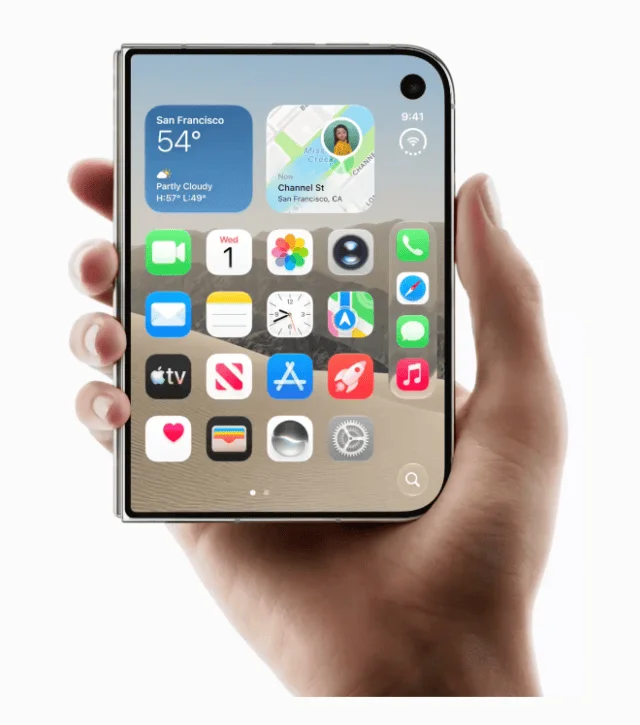
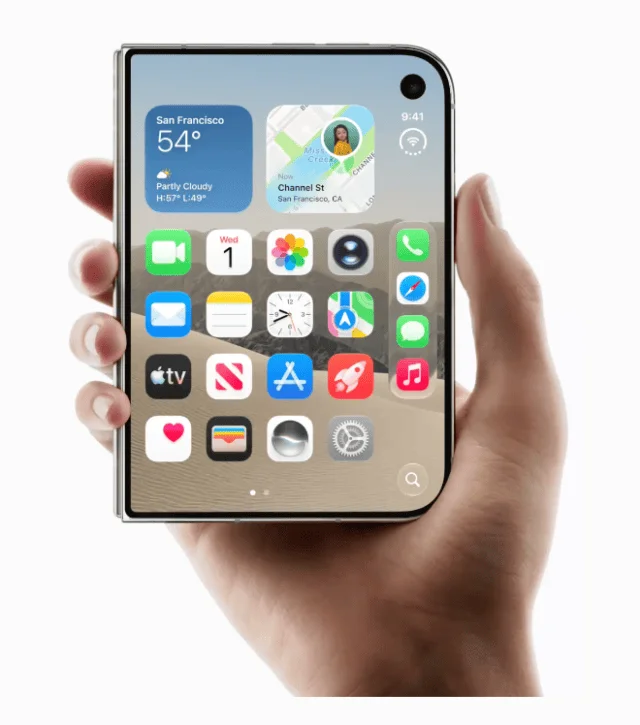
Apple’s iOS 27.3 beta 2 gives iPhone Duo owners another way to open the phone when it’s folded shut: “Unlock with Front Camera.” The feature uses the outer selfie camera to check a face on the Lock Screen, offering a quick alternative when reaching for the side mounted Touch ID sensor is awkward. Its narrow scope is the key detail. This is a convenience for opening the closed phone, not a replacement for Touch ID or a full Face ID system.

The distinction matters because iPhone Duo lacks the infrared TrueDepth hardware used for Face ID. Apple’s approach instead relies on the standard 12 MP outer front camera and on device machine learning to recognize a face in a two dimensional image. That makes the feature dependent on conditions that a dedicated facial recognition system can handle differently. Testers report quick unlocks in well lit surroundings, but say recognition slows or fails in dark rooms, with sunglasses or masks, and when the phone is held at an extreme angle.
Unlocking is limited to the closed phone
The camera option works only from the Lock Screen while iPhone Duo is closed. Once the device is unfolded, users need Touch ID or a passcode. That boundary gives the feature a clear job: provide fast access to the outer screen without trying to serve as a general purpose identity check across the phone.
It also cannot approve Apple Pay purchases, fill in credentials from the Passwords app, or open protected apps. Those limits make a difference in everyday use. A face check may be enough to reach notifications or the closed phone’s basic screen, but tasks involving payment details, saved logins or app protection still require a stronger authentication method. Users should expect to switch back to Touch ID or a passcode when moving from a glance at the Lock Screen to those more sensitive actions.

There’s another limit: camera unlocking switches itself off after roughly 45 minutes of inactivity. Touch ID must be used again before the camera option becomes available. The timeout makes the feature less suitable as a set and forget replacement for the fingerprint sensor. Instead, it acts as a shortcut during ordinary use, with Touch ID remaining part of the routine.
Lighting and hand position shape the experience
For people whose hands are wet or covered by gloves, avoiding the side sensor could make a quick check easier. In good light, testers describe the camera unlock as responsive enough for that kind of brief interaction. But the same setup has obvious trade offs: the standard camera depends on visible light and a usable view of the face. A dark room, face covering, sunglasses or an unusual angle can interrupt the convenience it’s meant to provide.
That makes the feature’s practical value depend on when and where someone uses the closed phone. It may help when checking a notification in a bright room, while someone who often reaches for the phone at night or keeps their face covered may still rely on Touch ID. The hardware choice also explains why the option should not be judged as a direct substitute for Face ID. It uses a simpler camera setup and is confined to a smaller set of actions.
Apple says facial recognition processing takes place on the device, with biometric data stored securely there. The feature can be enabled in Settings under Touch ID & Passcode. Those details describe how Apple has framed the option: local face processing for a limited unlock task, alongside existing authentication methods for other uses.
Beta availability and what to watch
Unlock with Front Camera is available to developers testing iOS 27.3 beta 2 on iPhone Duo. A public beta is expected to follow shortly, and the final public release of iOS 27.3 is scheduled for December. Those dates describe the current rollout plan; the feature’s availability beyond the developer beta depends on Apple’s software release.
For now, the clearest reason to try it is convenience when Touch ID is difficult to use and the phone is closed. The reported weaknesses in dim lighting and the inability to authenticate payments, passwords or protected apps are equally central to the experience. iPhone Duo owners can test whether the faster Lock Screen access fits their routine, while keeping Touch ID or a passcode ready whenever the camera cannot recognize them or an action needs stronger authentication.