First day cover ·
Google Messages' Enhanced Protection Is Available Early, Here's the Setup
Google Messages' Enhanced Protection adds AI scam analysis, deeper link scanning and sharper link warnings. Here's how to turn it on before the wider rollout.
Most phone threats are less about broken locks and more about a message that looks just right at the wrong moment. That's why a new layer inside Google Messages deserves more attention than its low-key placement suggests. Google is expanding the app's spam protection into a broader Enhanced Protection mode that covers all incoming messages, and you can opt in now without waiting for it to reach every phone.
What Enhanced Protection adds
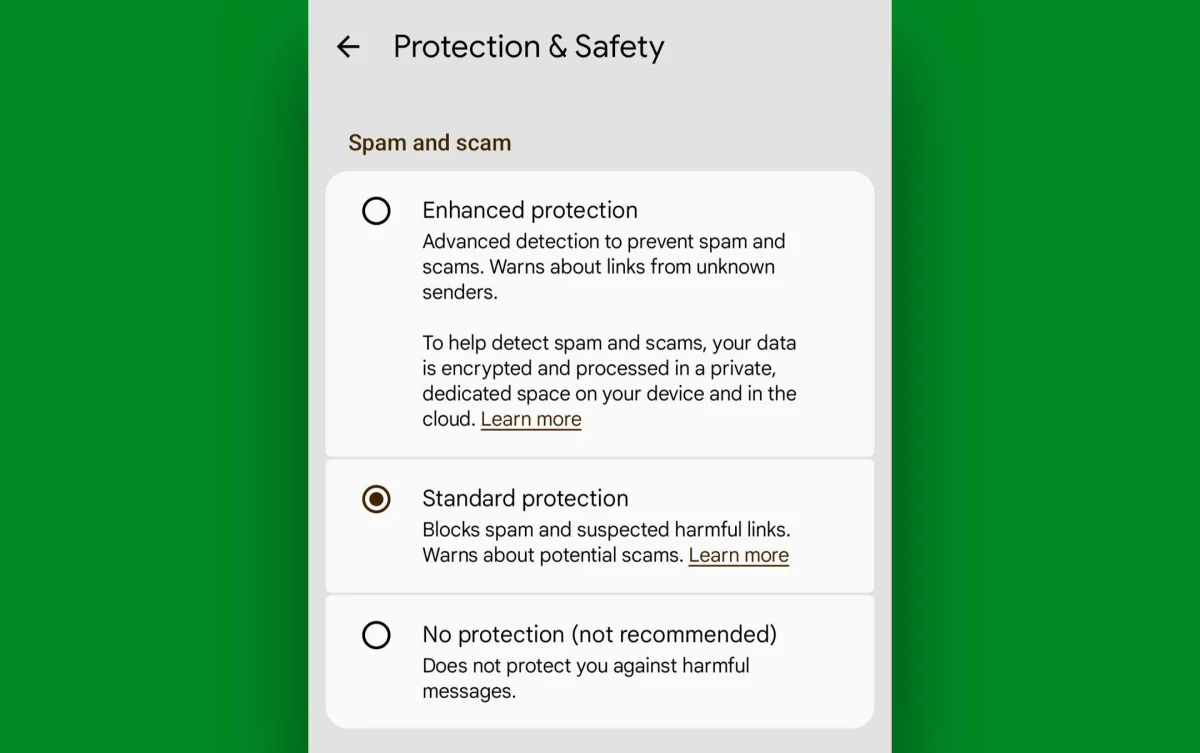
The app already had a basic spam filter buried in its settings. Enhanced Protection goes further with three distinct defenses, according to Google's description of the feature.
- AI-based analysis for messages from new or unknown senders. Google says this is aimed at "novel and sophisticated attacks," particularly the slow-burn conversations that try to pull small pieces of personal information out of you over several exchanges rather than in one obvious ask.
- Stronger link scanning that checks real-time signals for scammy elements or phishing traits, even when the destination site isn't already flagged as dangerous. That matters because plenty of fresh phishing pages are new enough to slip past reputation lists.
- More prominent warnings before you open a link from a potentially questionable sender. The extra prompt is there to confirm you meant to tap it, which is a small friction point that catches a lot of accidental taps.
Google says the processing is privacy-first. Some checks run on the device, and cloud-based analysis happens in an encrypted, dedicated environment that Google says makes the related data inaccessible to anyone else, Google included. I can't verify those internals from the outside, so treat that as the company's claim. Still, the on-device option is the part I'd like to see spelled out more clearly in the settings screen itself.
Here's the thing: this is a layer, not a replacement for judgment. The most convincing scams are the ones built to make you feel you're already in a normal conversation. A filter that flags the unusual sender or the sketchy link gives you a second look, and that's about all it's designed to do.
Getting it early: the three steps
The feature is open to anyone who opts in, but it isn't turned on automatically for everyone yet, and you won't see the full settings until a few components are current. If you want it now, the path has three parts.
Step one: join the Google Messages beta. Beta channels let you run features before the stable release reaches everyone. Joining is free and takes about a minute through the Play Store's beta program for the app. Make sure you're on the latest beta build once you're enrolled, since that's what carries the new options.
Step two: update Google Play system components. Google Play services powers a lot of the background work that apps like Messages depend on, and this feature relies on it. It's usually invisible, which is exactly why it's easy to forget. To check it, open system settings and search for "play." Choose "Google Play system update," then tap the line with the same name on the next screen. Let the device find and apply any pending updates. You'll likely be asked to restart once they finish.
Don't skip the restart. The new settings tend to appear only after the updated components have loaded, and I've seen people assume the feature is missing when a reboot was all it needed. (That's my experience and the general pattern with these rollouts, not a documented requirement.)
Step three: turn on the feature. Open Google Messages, tap your profile picture in the upper-right corner, and select "Messages settings." Tap "Protection & Safety," and you should see the expanded set of options. Select "Enhanced Protection," and it's active for your incoming messages.
What to watch and who should care
If you're on a phone that updates promptly and you get a steady stream of texts from people you don't know, this is worth turning on today. Delivery services, bank alerts, and marketing texts all blur together, and the link warnings in particular can save you from a bad tap. If your messages mostly come from family and existing contacts, the benefit is smaller, but the setting costs you nothing to enable.
The main trade-off to watch is friction. More warnings before opening links are the point, but they'll slow you down on legitimate links from new senders. That's a fair price, and you can judge for yourself after a week or two of use.
My read is that this kind of expansion is where messaging security is heading: fewer single-rule filters, more contextual checks that look at how a conversation develops. Google hasn't said when the feature will reach every phone in a stable release, so joining the beta is the only way to get it now. Keep the beta running if you like it, and check back on the settings screen after future Play system updates, since the options may change as the rollout continues.


